Not registered yet? Go to Step 2: Installer Sign-Up to create your account before logging in.
Users can log in to the Form Panda app using their Email and Password. If you’ve forgotten your password, tap “Forgot Password?” to recover it.
After clicking the “Login” button, a six-digit verification code will be sent to your registered mobile number. Enter the six-digit code and click “Verify”.(You can resend the code once the timer expires.)
Once verification is complete, a pop-up will appear requesting location access. Tap “Agree” to continue using the app.
2. Getting Started with the Form Panda App - Installer Sign Up / Register
If you’re new to Form Panda, click the “Sign Up as Solar Installer” link on the login screen.
Enter the required details in the registration form.
Verify your email address by clicking the “Send Code” button next to field. Enter the code received to complete the verification.
Tick the box next to I have read and agree to the Terms & Conditions and Privacy Policy.
Click “Signup” to complete your registration.
Once registered, you can log in and start the verification process.
3. Account Verification Documents
Please make sure you have the following documentation, to complete your registration process.
Installer Selfie
Driver’s Licence
SAA Licence
Electrical Licence
Signature
Terms and Conditions
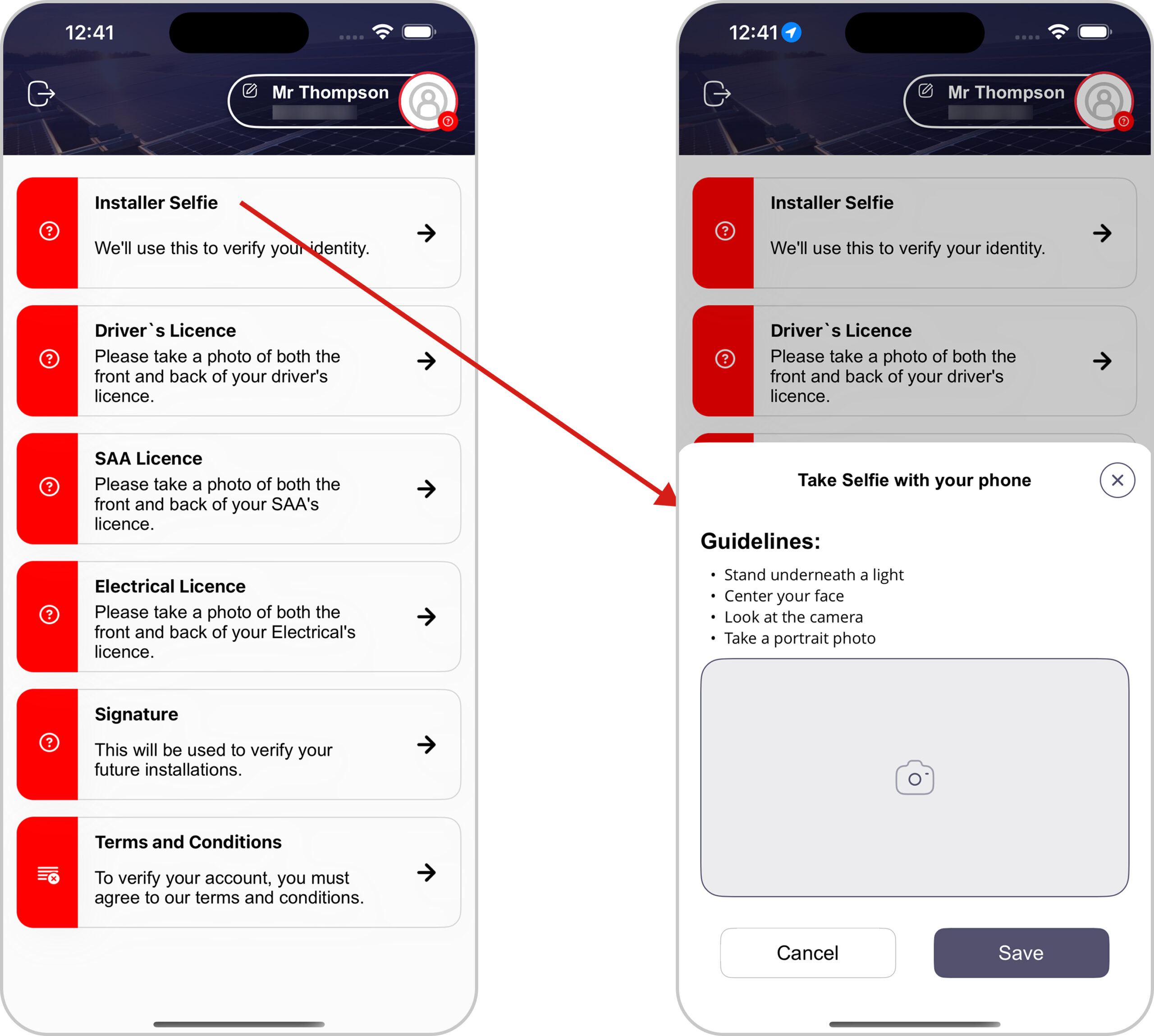
1. Installer Selfie
Solar installer need to provide selfie to complete the identity verification process.
Click on the “Installer Selfie” option, A pop-up titled as “Take Selfie with Your Phone” will appear.
Tap the “camera” icon to capture a real-time selfie by following the guidelines mentioned above and “Save” by clicking save button.
2. Driver’s Licence
Solar installer need to upload the front and back images of their Driver’s Licence to complete the verification process.
Click on the “Driver’s Licence” option, A pop-up titled as “Take Driver’s Licence Photo” will appear.
Select the “Expiry Date“, tap the “Camera” icon to upload the “Front” and “Back“photos of your Driver’s Licence by following the guidelines, and click “Save“.
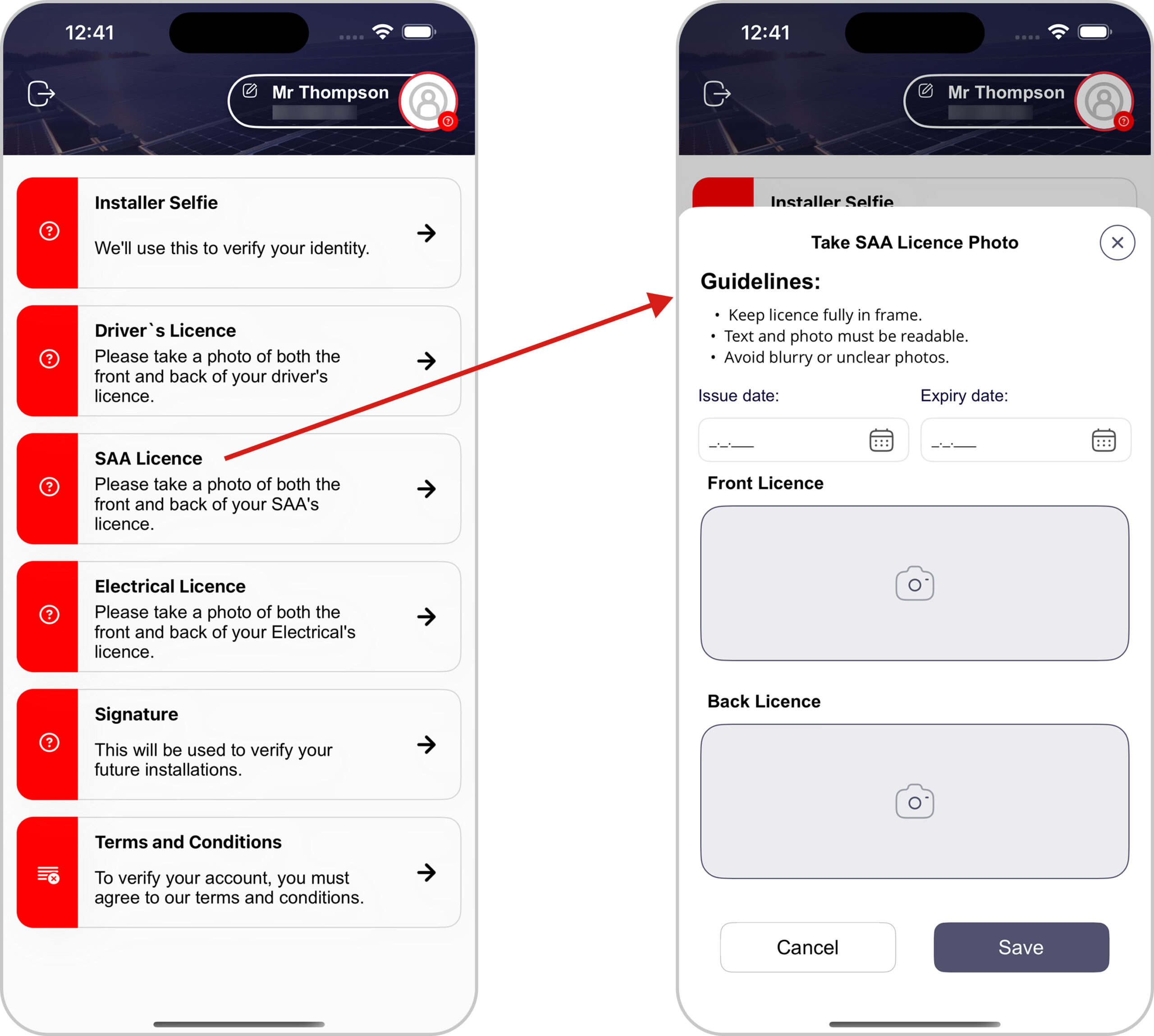
3. SAA Licence
Solar installers are required to upload front and back Photos of their SAA Licence to complete the verification process.
Click on the “SAA Licence” option, A pop-up titled as “Take SAA Licence Photo” will appear.
Select the “Issue” and “Expiry Date“, tap the “Camera” icon to upload the “Front” and “Back“photos of your SAA Licence by following the guidelines, and click “Save“to save the record.
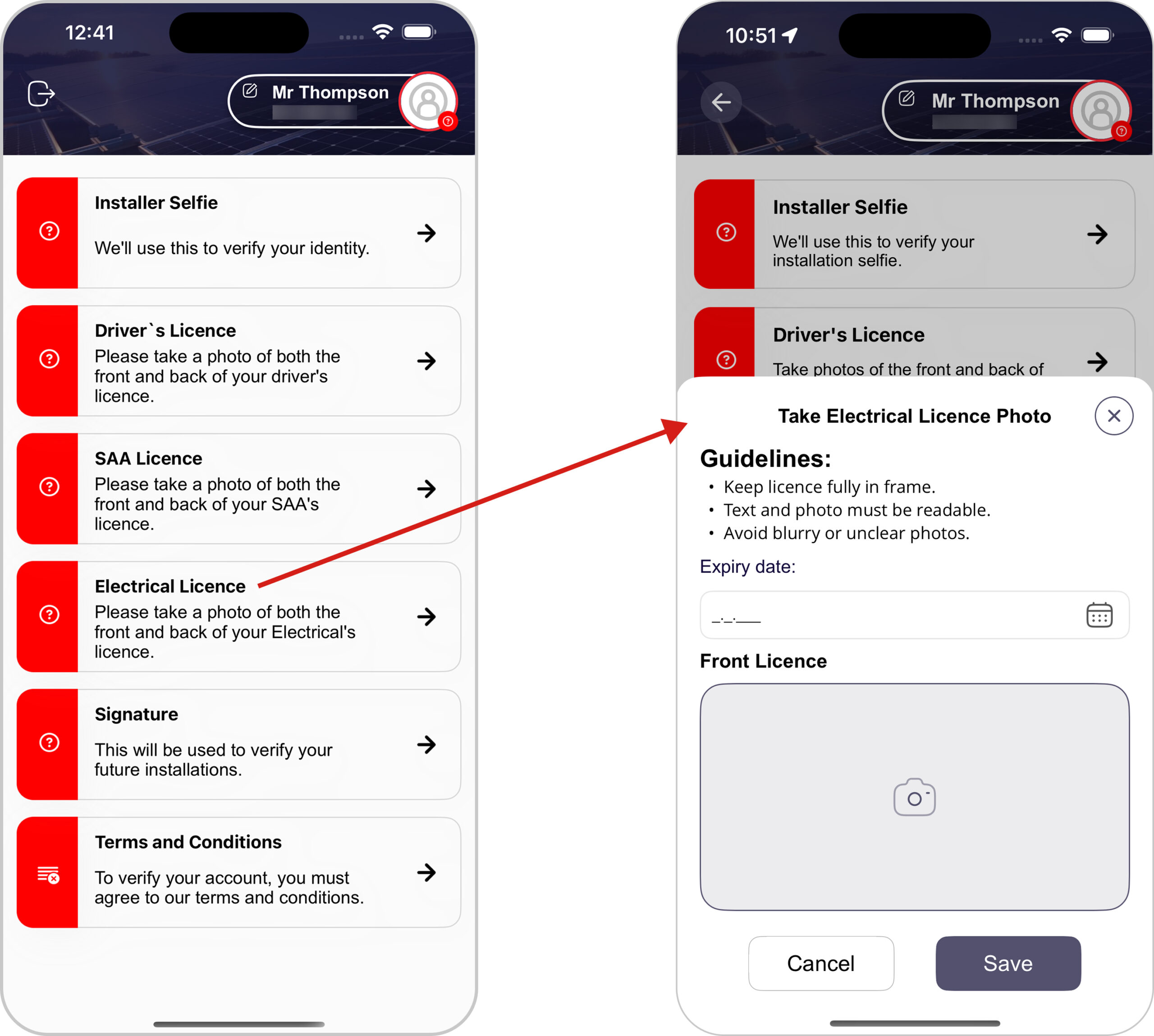
4. Electrical Licence
Solar installers are required to upload Front Licence Photo of their Electrical Licence to complete the verification process.
Click on the “Electrical Licence” option, A pop-up titled as “Take Electrical Licence Photo” will appear.
Select the “Expiry Date“, tap the “Camera” icon to upload the “Front” photo of your Electrical Licence by following the guidelines, and click “Save“button.
5. Signature
Installers need to provide their signature to ensure verification for future installations.
Click on the “Signature” option, A pop-up titled as “Signature” will appear.
Installer need to provide their “Signature” in the specified field and click “Save“button to save their record.
6. Terms & Conditions
To finalize their account verification, installers must agree to Form Panda’s terms and conditions.
Click on the “Terms & Conditions” option, A pop-up titled as “Terms & Conditions” will appear.
Installer need to agree Terms & Conditions by clicking the “Accept“button.
Once all documentation is provided, installers need to submit their details by clicking the “Submit Profile” button.
Once the profile is submitted, all sections moved to the pending state, awaiting admin approval.
The “Terms and Conditions” will show a “Verified” status once the user accepts them.
Once all sections are approved by the admin, the status will change from “Pending” to “Approved“.
The system prevents users from updating profile details when the status is”Pending” or “Approved“.
Users are required to submit information as per the guidelines, Missing documentation can lead to delays in account approval.
Once the profile is approved, the “back arrow” icon will be visible at the top, allowing the user to access the dashboard screen by clicking it.